
Autodesk’s Maya, 3ds Max and Arnold updates combine new AI features with improvements like a procedural RBD workflow for Bifrost and automated horse motion in MotionMaker.

Line shader - Line → UV Transform (screen space). Arnold's new shading tools include stylised line options.
Autodesk has introduced updates across Maya, 3ds Max, Flow Studio and Arnold, combining new artificial intelligence features with general improvements to existing tools. The company says the goal is straightforward – reduce the steps between an idea and a finished shot.
"We're focused on making content creation easier, and AI is one way we can do that," said Kamal Mistry, Senior Director of Product at Autodesk. "What matters to us is that AI is done right. It needs to be controllable, editable, trustworthy and accessible to creators and professionals."
Working with OpenUSD is more accessible with a new Component Creator in Maya, which shows users the way to structure assets correctly from the outset so that they can create a USD asset from Maya scene objects. The resulting USD hierarchy is structured according to a customisable JSON template, helping to standardise the structure between assets.

Maya's Bifrost environment now includes a Rigid Body Dynamics workflow for destruction simulations that is fully procedural. Physics, constraints and fractures can all be adjusted and re-simulated without rebuilding a scene from scratch. Combined with the Autodesk Flow Wedging plug-in that ships with Bifrost, users can run multiple variations in parallel as a cloud-based operation, directly from Bifrost, and compare a wider range of results more quickly.
Similar to the idea of bracketing the exposure in photography, Wedging can be effectively applied to fluid and other simulations but, due to the computation needed for a full series of simulations, it can be time-consuming. After preparing a Bifrost graph, you can submit it as a Wedging job to the cloud while keeping your local computer's resources free.
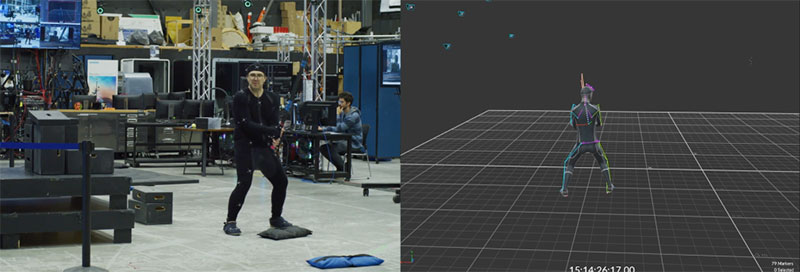
In Maya's MotionMaker tool, an interesting time-saver is a horse archetype, added to the existing biped and canine motion styles in the MotionMaker library. Animating a horse to walk, trot, canter, gallop and perform the transitions between them has traditionally been labour-intensive.
MotionMaker now uses AI to generate a base motion in a few seconds, giving animators a starting point they can shape, rather than having to build up the motion each time from scratch. Adjustments such as changing a horse's path or altering its speed while preserving its natural, characteristic gait no longer require starting over.

A new generative AI model called Wonder 3D has been added to Flow Studio. It converts text prompts or reference images into 3D characters and objects. To access it quickly, a new Flow Studio Launcher button has also been added to Maya.
Potential uses are previsualisation and concept work, or to populate scenes. Generated assets can be exported to 3ds Max, Maya, Blender or Unreal Engine for further development. Editors can iterate directly on the assets without starting over, and optimise the geometry of 3D assets to better fit the downstream workflow, applying colour and surface detail at the same time.
For both 3ds Max and Maya, Smart Bevel is a new modelling feature developed for post-Boolean workflows. It creates smooth geometry transitions across surfaces, unconstrained by edge loops or polygon flow, and is fully non-destructive, meaning adjustments can be made throughout the construction history. The tool handles complex bevelling across multiple sets of curved edges in a single operation.
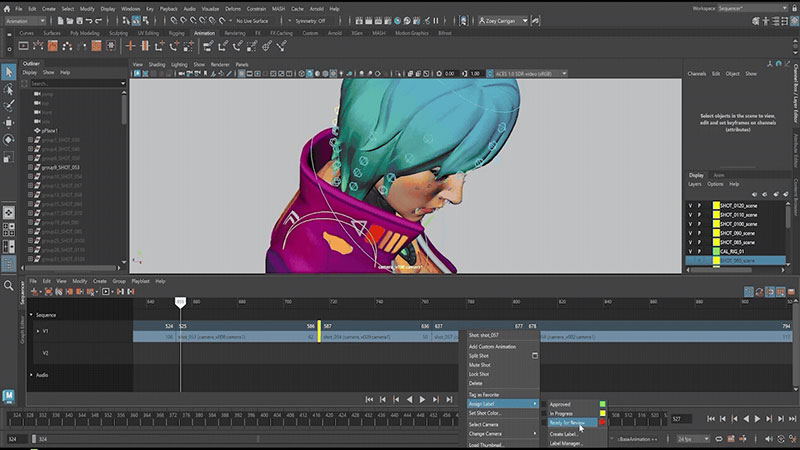
Maya's Camera Sequencer has been redesigned and is now simply called Sequencer. Built for previs and layout artists, a high-DPI timeline and new UI help users move quickly across multiple shots and tracks. The updates include time scaling, custom labels, colour coding, automatic thumbnails and smarter sub-sequencer grouping.
The Playblast functionality is improved with scene names, full audio and viewport-matching results. A dedicated workspace, synchronised timing, full undo support are also part of the refresh. Expanded hotkey support and new colour controls in Maya's preferences give users further room to configure the tool to their own working style.
Using a new Variant Manager, an artist can define and manage asset variations – different models or configurations – and toggle between them as needed. The Asset Resolver in both 3ds Max and Maya gives visibility and control over how assets are resolved and how paths are mapped, making it easier to diagnose loading issues as scenes grow more complex.
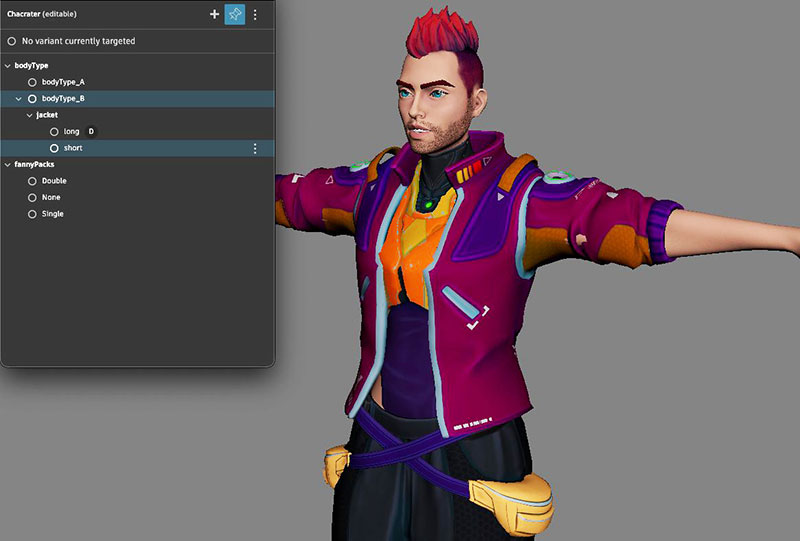
Variant Manager
The Arnold renderer has been updated with speed improvements across complex scenes and volumes like smoke or clouds, covering USD instancing, volume rendering and GPU rendering. Hair rendering has been refined for close-up work, and bloom rendering has been updated to support both realistic and stylised lens effects.
New shading tools include stylised line options (see robot image at the top of this article) and a nearest points shader for point-based and data-driven effects. This shader samples nearby points from geometry or point cloud data and exposes their properties to the shading network. It can read point data from geometry and OpenVDB sources. It computes distances and relationships to nearby points and outputs shading data based on those calculations. This enables effects such as network-like connections, proximity-based colour changes and graph-style visualisations.
Maya now includes an updated, fully-integrated Skin Tools set based on ngSkinTools, adding layered, non-destructive deformer weighting along with improved smoothing and mirroring. This makes the complete layer-based system, advanced masking and mirror tools for character skinning directly accessible in Maya. Users can refine, iterate and solve complex deformations with greater control and confidence.
LookdevX, Maya's material authoring system, can now accept third-party generative texturing solutions. Autodesk has also released a tech preview of Autodesk Assistant, an AI interface for querying the company’s software documentation in natural language. This preview is now available inside both 3ds Max and Maya.
Full release notes for 3ds Max and Maya are available on the Autodesk help site. www.autodesk.com